
World of Warcraft: Midnight introduces significant graphical upgrades including the new Void Lighting Engine, enhanced particle effects for Void magic, and completely revamped zone textures for the Quel’Thalas region. These improvements come with updated system requirements that may challenge older hardware configurations. This guide provides the complete minimum and recommended system requirements for WoW Midnight, analyzes the impact of the Void Lighting Engine on performance, and offers optimization tips to help you achieve stable framerates regardless of your PC’s specifications.

Official Minimum and Recommended System Requirements
Blizzard has updated the official system requirements for World of Warcraft: Midnight to reflect the graphical and technical improvements introduced in the expansion. The Void Lighting Engine, which powers the dramatic Void energy effects, dynamic shadow casting, and atmospheric lighting in the revamped Quel’Thalas zones, represents the most significant technical advancement in World of Warcraft since the introduction of the DirectX 12 support in a previous expansion. Players with older hardware should carefully review these requirements to determine whether upgrades are necessary before launch.
| Component | Minimum Requirements | Recommended Requirements |
|---|---|---|
| Operating System | Windows 10 64-bit | Windows 10/11 64-bit |
| Processor (CPU) | Intel Core i5-4690K / AMD FX-8300 | Intel Core i7-8700 / AMD Ryzen 7 2700X |
| Memory (RAM) | 8 GB | 16 GB |
| Graphics (GPU) | NVIDIA GTX 1660 / AMD RX 5600 XT (4GB VRAM) | NVIDIA RTX 3060 / AMD RX 6700 XT (8GB VRAM) |
| DirectX | Version 12 | Version 12 |
| Storage | SSD with 100 GB available space | NVMe SSD with 100 GB available space |
| Network | Broadband Internet connection | Broadband Internet connection |
The minimum requirements represent the absolute baseline for running WoW Midnight at low to medium settings with acceptable framerates in solo questing content. Players whose systems meet only the minimum specifications should expect framerate drops during large-scale Void invasion events, crowded city areas, and raid encounters with heavy particle effects. The recommended requirements target 1080p high-to-ultra settings at a stable 60+ FPS in virtually all content, including the most demanding raid and Mythic+ environments.
Notably, the storage requirement now mandates an SSD as the minimum, reflecting World of Warcraft’s increasing reliance on fast asset loading for its streaming zone technology. Players still running WoW from a traditional hard drive will experience severe stuttering and loading delays, particularly in the newly revamped Silvermoon City where the Void Lighting Engine continuously streams high-resolution textures and dynamic lighting effects. Upgrading to even a budget SATA SSD provides a more significant quality-of-life improvement than many players realize.
The Void Lighting Engine and Its Performance Impact
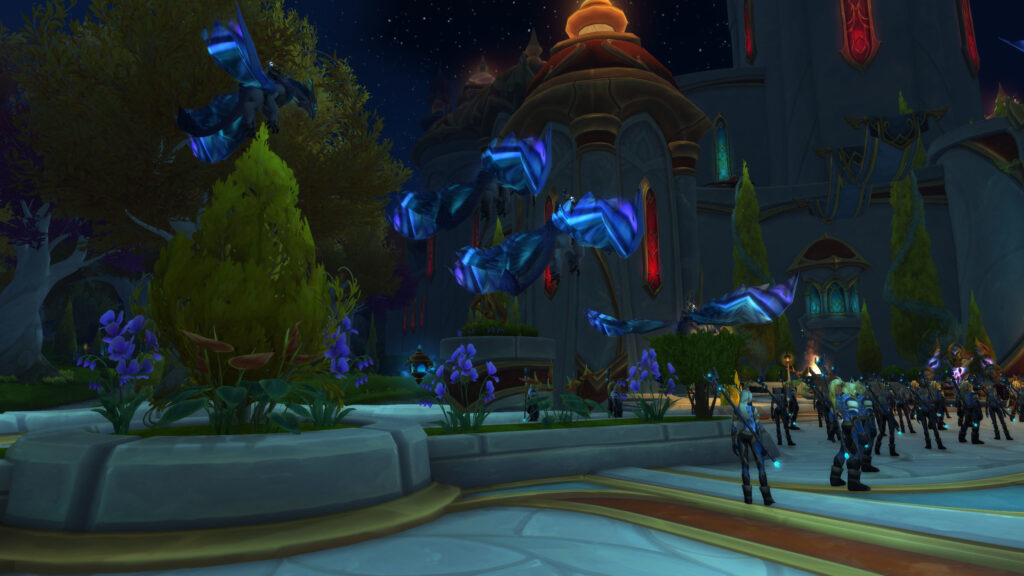
The Void Lighting Engine is the flagship technical feature of World of Warcraft: Midnight, responsible for rendering the dramatic Void energy effects that permeate the corrupted zones of Quel’Thalas. This engine upgrade introduces real-time global illumination, dynamic shadow mapping for all spell effects, volumetric light shafts through Void rifts, and enhanced particle density that makes Void magic visually spectacular but computationally demanding. The Void Lighting Engine operates exclusively through DirectX 12, meaning that older GPUs lacking DX12 support cannot access these graphical enhancements regardless of their raw processing power.
The performance impact of the Void Lighting Engine varies dramatically depending on your graphics card generation and VRAM capacity. NVIDIA GPUs from the RTX 20-series and newer, as well as AMD GPUs from the RX 6000-series and newer, handle the Void Lighting Engine with minimal performance penalty thanks to their dedicated hardware acceleration for ray-traced effects and advanced compute shader capabilities. Older GPUs from the GTX 10-series and RX 500-series generations can still run the engine but may experience 15-25% framerate reductions in areas with heavy Void corruption effects compared to similar areas in previous expansions.
- Global Illumination: Real-time bounce lighting that makes Void-corrupted areas feel authentically dark and oppressive, moderately GPU-intensive
- Dynamic Shadow Mapping: All spell effects and creatures cast accurate real-time shadows, significant impact on older GPUs
- Volumetric Light Shafts: Visible beams of light emanating from Void rifts and the Sunwell, heavy performance cost at maximum settings
- Enhanced Particle Density: Void spells feature significantly more particles than previous expansions, scales with graphics settings
- High-Resolution Texture Streaming: Requires SSD and sufficient VRAM (8GB recommended) to avoid texture pop-in and stuttering
VRAM capacity has become more important in Midnight than in any previous expansion due to the Void Lighting Engine’s texture streaming requirements. Graphics cards with only 4GB of VRAM can run the game but must use reduced texture quality settings to avoid VRAM exhaustion, which manifests as severe stuttering when entering new areas or encountering multiple Void-corrupted enemies simultaneously. Players with 8GB or more of VRAM will experience smooth texture streaming and can use high-to-ultra texture settings without performance concerns.
Graphics Settings Optimization for Best Performance
Optimizing your graphics settings for WoW Midnight involves balancing visual quality against framerate stability, particularly if your system falls between the minimum and recommended specifications. The following recommendations are based on extensive testing across a range of hardware configurations and represent the best compromise between visual fidelity and performance for most players.
- View Distance: Set to 7-10 for optimal performance; values above 10 provide minimal visual benefit while significantly impacting CPU performance
- Global Illumination: Medium for most systems; Low if experiencing stuttering in Void-corrupted areas; Ultra only for RTX 40-series and RX 7000-series GPUs
- Shadow Quality: Medium offers the best performance-to-quality ratio; High shadows cost 10-15% FPS with modest visual improvement
- Particle Density: Reduce to Medium in heavily populated areas and raids to maintain framerate stability during intense combat
- Volumetric Light Shafts: Disable or set to Low if struggling to maintain 60 FPS; this setting has the single highest performance cost in Void-corrupted zones
- Texture Quality: Set to High if your GPU has 6GB+ VRAM; Medium for 4GB VRAM cards; Ultra only for 8GB+ VRAM with fast memory
- Anti-Aliasing: CMAA Fastest for competitive play; SSAA for maximum visual quality if your GPU can handle the performance cost
The single most impactful setting change for players experiencing performance issues is reducing Particle Density and disabling Volumetric Light Shafts. These two settings are responsible for the majority of framerate drops during Void invasion events and raid encounters, where the screen fills with dozens of simultaneous particle effects. Reducing these settings dramatically improves framerate consistency with a visual trade-off that most players find acceptable given the performance benefit.
Should You Upgrade Your PC for Midnight?

If your current system meets or exceeds the recommended requirements, no upgrade is necessary for an excellent WoW Midnight experience. Players whose systems meet only the minimum requirements can still enjoy the expansion but should expect to use medium settings and may experience framerate inconsistencies in demanding content. Systems that fall below the minimum requirements, particularly those lacking an SSD or a DirectX 12-compatible GPU, should consider upgrades before launching Midnight to avoid a frustrating gameplay experience.
The most cost-effective upgrade path for underperforming systems is, in order of priority: first, install an SSD if you do not already have one (this provides the single largest quality-of-life improvement); second, upgrade your GPU to at least an RTX 3060 or RX 6700 XT equivalent if your current card lacks DX12 support or sufficient VRAM; and third, increase your system RAM to 16GB if you are currently running with only 8GB. CPU upgrades rarely provide meaningful improvements for WoW unless you are running a processor significantly older than the i5-4690K minimum specification.
For players building a new PC specifically for WoW Midnight, targeting the recommended requirements with a modern mid-range GPU such as the RTX 4060 or RX 7600 provides an excellent experience with headroom for future expansions. Pair this GPU with a current-generation six-core CPU and 16GB of RAM, and you will be able to run WoW Midnight at high-to-ultra settings with stable framerates well into the future. The investment in a quality PC for Midnight pays dividends across the entire Worldsoul Saga and beyond.



Leave a Reply